Content
Include a displayed image with a ticket upon ticket creation
Notice: This plugin is unmaintained and available for adoption.
Description
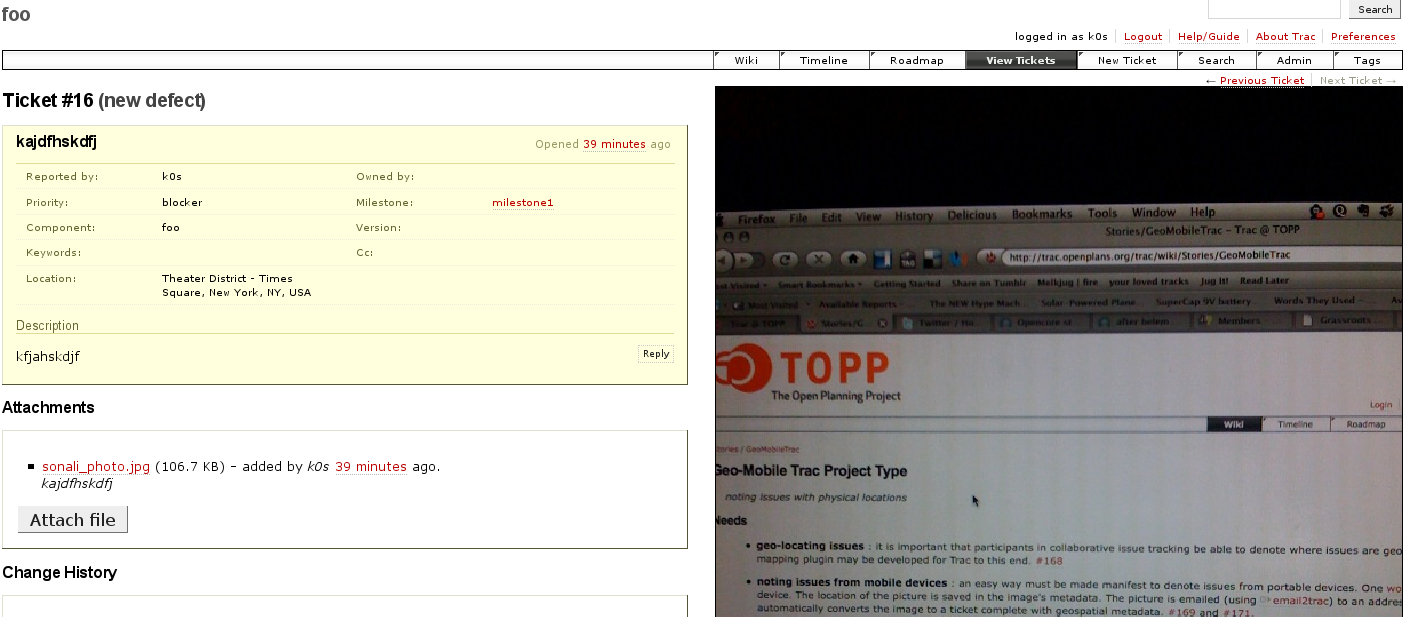
The ImageTracPlugin allows uploading of images to tickets upon ticket creation. The image is displayed beside the ticket using the TicketSidebarProviderPlugin. This is useful when one wants to associate images with tickets. Additional work, such as displaying a thumbnail next to query results, may be done as time permits.

Note: This screenshot is out of date. Better submissions are welcome.
Included below is the README:
ImageTracPlugin
The ImageTracPlugin allows images to be attached to Trac tickets and displayed.
Components
Several components are included in the ImageTrac plugin:
ImageTrac
ImageTrac is the core of the ImageTracPlugin. This plugin processes
uploaded attachments and, if they are images, will create images of the appropriate size as dictated by the
[ticket-image]section of the trac.ini configuration.
Two sizes are included by default, thumbnails and a default size, but an arbitrary number of sizes can be used. Configuration is given for the default case as follows
[ticket-image]
size.thumbnail = 32x32
size.default = 488x
This specifies a thumbnail of 32 by 32 pixels and a default size of 488 pixels in width with a height taken from the aspect ratio of the uploaded image. Currently, images are not scaled up. Scaling is done with the Python Imaging Library and a front-end function packaged in cropresize.
ImageTrac can also enforce image uploading on ticket creation and
includes the ticket images in the data passed to the
ticket.htmltemplate.
DefaultTicketImage
The DefaultTicketImage component allows the setting of a default
image for a ticket. It maintains a database table, default_image,
which stores which image is the default
Galleria
The Galleria component adds the galleria javascript image gallery and accompanying CSS to allow the display of images in a gallery format.
ImageFormFilter
The ImageFormFilter component adds a form on the ticket page that allows uploading of an image on ticket creation or ticket editing. Images so uploaded should become the default image (NOTE: there is currently a bug whereby this is not the case).
SidebarImage
The SidebarImage component displays the images in an unordered list in the ticket sidebar using the TicketSidebarProviderPlugin.
TicketImageHandler
The TicketImageHandler component serves the images at
/ticket/<ticket id>/image/<size>. For example, the thumbnail of
ticket 67 would be displayed at /ticket/67/image/thumbnail.
Usage
It is recommended that you enable all of the components of the ImageTracPlugin.
Bugs/Feature Requests
Existing bugs and feature requests for ImageTracPlugin are here.
If you have any issues, create a new ticket.
| defect |
5 / 8 |
||
|---|---|---|---|
| enhancement |
0 / 2 |
Download
Download the zipped source from here.
Source
You can check out ImageTracPlugin from here using Subversion, or browse the source with Trac.
Installation
General instructions on installing Trac plugins can be found on the TracPlugins page.
Recent Changes
- 13934 by rjollos on 2014-05-20 22:57:31
-
Fixed checking for table existence in Trac 1.0 and later. Refs #11754.
- 13933 by rjollos on 2014-05-20 22:37:24
-
Fixed indentation and removed unused imports.
- 12984 by rjollos on 2013-04-19 16:30:50
-
Refs #7262: Point
setup,pylink to TracSqlHelperScript0.11directory rather thananyreleasedirectory.
(more)
Author/Contributors
Originally developed at The Open Planning Project
Author: k0s
Maintainer: none (needsadoption)
Contributors:
Attachments (1)
-
image-trac-example.png (560.7 KB) - added by 17 years ago.
screenshot of the ImageTracPlugin
Download all attachments as: .zip