Contents
Display PDF or SVG images as PNG in wiki pages and tickets
Description
This plugin inserts vector graphics like PDFs or SVGs as PNG-images into a Trac wiki page or Trac ticket.
It requires convert from ImageMagick. However, convert may fail on specific files. Additionally, Ghostscript is required for convert on Windows, which is available here.
The handling and the parameters are inspired by LaTeX includegraphics and the Trac ImageMacro.
Examples:
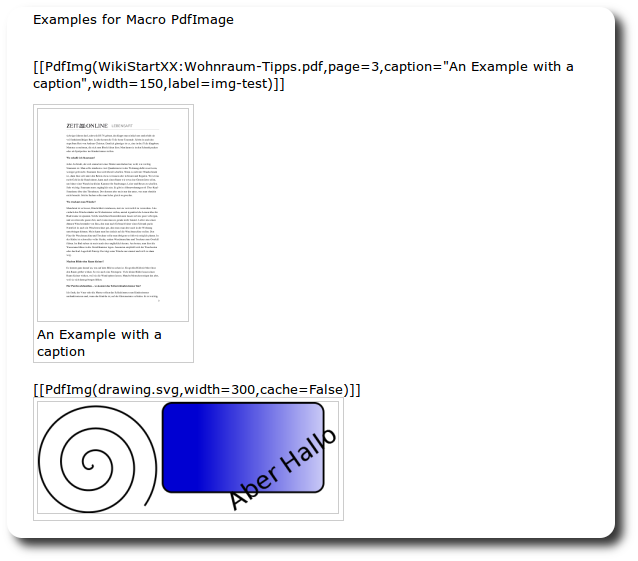
[[PdfImg(Book.pdf, width=400, page=100, caption="Page 100 from Book Example")]]
[[PdfImg(source:testpro/drawing.svg@10,width=600,caption="SVG-image from repository in version 10")]]
[[PdfImg(ticket:1:file.pdf)]]
[[PdfImg(sketch.svg, cache=False)]]
[[PdfImg(OtherPage:foo.pdf)]]
[[PdfImg(file:relpath/to/foo.pdf)]]
More examples:

Note: PDF conversion with ImageMagick-convert:
- may fail on specific PDFs. This is not a problem of the plugin, but of
convert. In this case you will get an error likeCan't display foo.pdf, ImageMagick->convert failed with errorcode=... , command=convert ... - if not restricted to certain pages, it can take very long; example: Converting a PDF file of 400 pages by simply
[[PdfImg(test.pdf)]]took several minutes! See #9874, #9875.
Requirements
- Install
convertfrom the ImageMagick-suite. - Tested on Linux.
Tested on this configurations:
| Operating System | Trac | Imagemagick |
| Ubuntu 11.04 | 0.11.7-4 (deb) | 7:6.6.2.6-1ubuntu |
| Ubuntu 10.04.4 LTS | 0.12.2 (easy_install) | 7:6.5.7.8-1ubuntu |
| Win64 Server 2003 R2 | 0.12.2 (Bitnami) | ImageMagick-6.7.5-6-Q16-windows-x64-dll.exe Ghostscript gs902w64.exe |
Parameters
Possible Trac links for resource: The Location of the file can be an attachment (wikipage, ticket, svn) or a local file (keyword "file:").
| Trac link (resource) | Alternatives | Comment |
|---|---|---|
| wiki | JustPageName | Attachment in wikipage |
| ticket | #1 | |
| source | browser,repos | |
| file | need configuration file.prepath
|
Parameters:
| Parameter | Value | Default | |
|---|---|---|---|
pdffile | resource of PDF-file | required | |
| page | Page to display | 1 | starting with 1 |
| width | width in pixel | 600 | must be absolute value |
| caption | Caption under Image | none | |
| label | anchor to link to | ||
| cache | build once or each time | True | time consumption or changing vectorgraphics |
| align | left|right | nothing |
Bugs/Feature Requests
Existing bugs and feature requests for PdfImagePlugin are here.
If you have any issues, create a new ticket.
| defect |
1 / 3 |
||
|---|---|---|---|
| enhancement |
0 / 3 |
Download
Download the zipped source from here.
Source
You can check out PdfImagePlugin from here using Subversion, or browse the source with Trac.
Installation
General instructions on installing Trac plugins can be found on the TracPlugins page.
Configuration
No configuration is needed, except when using the resource 'file:' the following configuration must be set:
Suppose your server is http://example.com and the webserver config mapped your local directory /absolute/entry/directory to the public directory entrydir, then your configuration for the file:-resource looks like:
[pdfimg]
file.prepath = /absolute/entry/directory
file.preurl = http://example.com/entrydir
Recent Changes
- 11408 by ursaw on 2012-03-21 08:10:12
-
changed external convert command according
ticket:9874#comment:5
- 11356 by ursaw on 2012-03-02 21:13:38
-
#9842 single quotes in convert command are optional under Linux, Windows dont like them..
- 11343 by ursaw on 2012-02-29 19:14:47
-
changed files and folders to lowercase
(more)
Author/Contributors
Attachments (1)
-
PdfImg_screenshot.png (63.1 KB) - added by 12 years ago.
Screenshot with PDF and SVG
Download all attachments as: .zip