


Modular styles manager for Trac installations
Description
Adds a simple API and GUI for packaging and configuring Trac themes. Themes may just change colors but can also replace templates and add javascript.
Compatibility
Trac 1.4 and Trac 1.6 are supported. For Trac 1.4 theme authors should provide both Genshi and Jinja2 templates. This way older plugins with a web UI which are still using Genshi are fully supported.
The theme engine gracefully handles missing theme templates when rendering so if a theme author doesn't provide Genshi templates all UI pages still depending on Genshi will just be rendered without the theme.
Configuration
trac.ini
All configuration options go in the [theme] section.
- theme : optional, default: "default"
- Theme name to use. Name is case-insensitive.
- enable_css : optional, default: false
- Enable or disable the CSS customizations.
- color.* : optional
- Stored values for simple CSS overrides. Note that changing this will not take effect until you save them in the admin panel.
Web interface
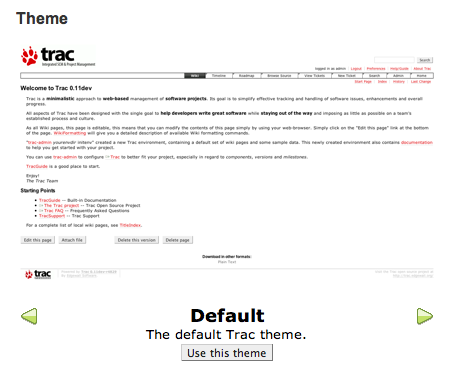
Theme
Use the arrows to select your theme from the installed options and then click the button to activate it.
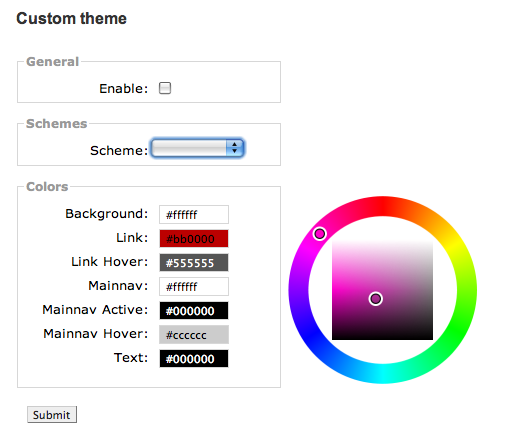
Customize
Here you can further customize your theme by changing colors for certain pieces of the UI. The scheme drop down allows you to load pre-configured color schemes. Note that not all themes will support this, or support the same options.
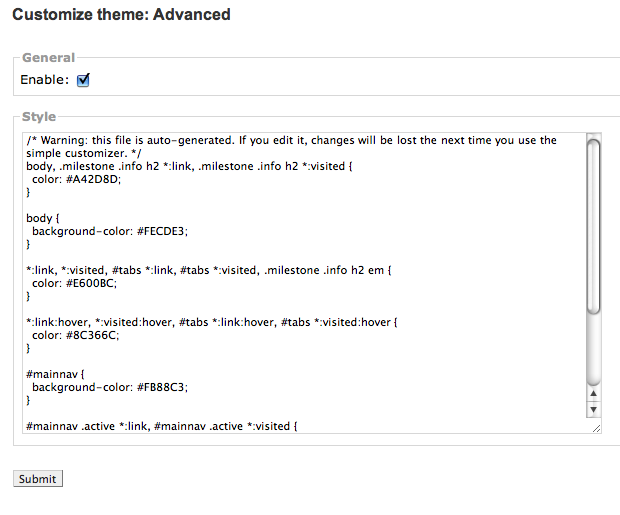
Customize: Advanced
Here you can customize the CSS even further. As mentioned in the file, if you edit this file by hand, you should not use the simple customizer system or you will lose your changes.
Example
To enable the PyDotOrg theme:
[theme]
theme = pydotorg

[components]
themeengine.* = enabled
pydotorgtheme.* = enabled
Creating a theme
Simple way
The easiest way to make a new theme is to inherit from ThemeBase. A basic example theme is as follows:
from trac.core import *

from themeengine.api import ThemeBase

class ExampleTheme(ThemeBase):
    """A example theme."""

    template = htdocs = css = screenshot = True
The name will be inferred from the class name ("Example" in this case) and the docstring will be used as the description. There are several class variables you can set to configure the theme. By default all of these are set to False and so are disabled. If set to True, each option will use a generally sane default. If set to any value other than those, that value will be used directly.
The available options as follows (all are optional):
- template : default: $name_theme.html
- The filename of the Genshi replacement template.
- jinja_template : default: $name_theme_jinja.html
- The filename of the Jinja2 replacement template.
- css : default: $name.css
- Filename for a stylesheet to include or a list/tuple of filenames.
- disable_trac_css : default: True
- A boolean indicating if the core Trac CSS should be diabled.
- htdocs : default: htdocs
- Subfolder containing static content.
- screenshot : default: htdocs/screenshot.png
- Package-relative path to the screenshot file. File should be 640x400 or use the same aspect ratio.
- colors :
- Specifiers for simple color customization system. This should be an iterable of tuples of the form (name, property, selector). name will be shown in the customization UI for that entry. property will generally be color or background-color. selector should be a CSS selector string to apply the color rule to.
- schemes :
- Pre-built color schemes. This should be an iterable of tuples of the form (name, color_dict). The color_dict should be a dictionary mapping color name to hex color string (of the form #00AAFF).
Advanced API
For more advanced control you can implement IThemeProvider from themeengine.api. The interface definition is:
class IThemeProvider(Interface):
    """An interface to provide style information."""

    def get_theme_names():
        """Return an iterable of names."""

    def get_template_overrides(name):
        """(Optional) local changes to specific templates

        Return a sequence of tuples (old_html, new_html, function) where

         old_html::
           The name of the template overriden by this theme.
         new_html::
           The name of the template file replacing the former.
         function::
           Optional callback (or None) to add further data . Signature:
                   req::
                       Request object
                   template::
                       The value of `old_html` above
                   data::
                       Template data, may be modified
                   content_type::
                       Reported MIME type

        since 2.2.0
        """

    def get_theme_info(name):
        """Return a dict containing 0 or more of the following pairs:

         description::
           A brief description of the theme.
         template::
           The name of the Genshi theme template file.
         jinja_template::
           The name of the Jinja2 theme template file.
         css::
           The filename of the CSS file or a list/tuple of filenames.
         disable_trac_css::
           A boolean indicating if the core Trac CSS should be diabled.
         htdocs::
           The folder containing the static content.
         screenshot::
           The name of the screenshot file.
         colors::
           A list of (name, css-property, selector) tuples.
         schemes::
           A list of (name, {color-name: value, ...}) tuples.
         scripts::
           A list of (filename, mimetype, charset, ie_if) respectively for
           script (relative | absolute) URI (mandatory),
           script MIME type (optional , defaults to 'text/javascript'),
           script charset encoding (optional, defaults to 'utf-8'),
           and a bool flag for MSIE-only shims (optional, defaults to False)
           @since 2.2.2
        """
Most of these are the same as the simple API above, except description is explicit.
Example
See the following code example from a theme plugin providing Genshi and Jinja2 templates.
class TracFlatTheme(ThemeBase):
    """A flat Trac theme using Tracs colors."""

    screenshot = False
    htdocs = True
    template = jinja_template = True

    # IThemeProvider methods

    def get_theme_names(self):
        yield "TracFlat"
        yield "TracSidebar"
        yield "TracFlatSidebar"

    def get_theme_info(self, name):
        if name == 'TracFlat':
            return {'description': _("A flat Trac theme using Tracs colors."),
                    'css': 'css/tracflattheme.css',
                    'htdocs': 'htdocs',
                    'disable_trac_css': True}
        elif name == "TracSidebar":
            return {'description': _("A theme using a sidebar for the main navigation menu."),
                    'css': 'css/tftsidebar.css',
                    'jinja_template': 'templates/theme_jinja.html',
                    'template': 'templates/genshi/theme_genshi.html',
                    'htdocs': 'htdocs',
                    'scripts': [('js/tftsidebar.js',)],
                    'disable_trac_css': False}
        elif name == "TracFlatSidebar":
            return {'description': _("A theme using a sidebar for the main navigation menu and flat elements."),
                    'css': ['css/tracflattheme.css', 'css/tftsidebar_flat.css'],
                    'jinja_template': 'templates/theme_jinja.html',
                    'template': 'templates/genshi/theme_genshi.html',
                    'htdocs': 'htdocs',
                    'scripts': [('theme/js/tftsidebar.js',)],
                    'disable_trac_css': True}
Customizing specific views
Since version 2.2.0 it is possible to customize specific views by implementing (optional) get_template_overrides method. For instance the following sample code will change ticket and wiki views using custom Genshi templates:
class CustomTheme(...):

    #------8<------ Code omitted ------8<------

    def get_template_overrides(self, name):
        """Override ticket and wiki templates using custom templates
        """
        yield ('ticket.html', 'custom_ticket.html', None)
        yield ('wiki.html', 'custom_wiki.html', self._modify_wiki)

    def _modify_wiki(self, req, template, data, content_type):
        data['var'] = 'value'
Notice that, in sample code, new data will be added to render wiki pages.
See also: TracExampleTheme
Bugs/Feature Requests
Existing bugs and feature requests for ThemeEnginePlugin are here.
If you have any issues, create a new ticket.
| defect |
27 / 28 |
||
|---|---|---|---|
| enhancement |
7 / 9 |
||
| task |
4 / 4 |
Download
Download the zipped source from here.
The plugin is also available on PyPI.
Source
You can check out ThemeEnginePlugin from here using Subversion, or browse the source with Trac.
Installation
General instructions on installing Trac plugins can be found on the TracPlugins page.
To enable this plugin, add the following to your trac.ini file:
[components]
themeengine.* = enabled
To specify a theme, add the following to your trac.ini file:
[theme]
theme = <Name>
Recent Changes
- 18454 by rjollos on 2021-10-18 16:56:07
-
ThemeEnginePlugin: Release version 2.3.1
Version 2.3.0 had a packaging problem.
Refs #14058.
- 18453 by rjollos on 2021-10-16 20:00:03
-
TracThemeEngine: Add release command
- 18452 by rjollos on 2021-10-16 19:57:10
-
ThemeEnginePlugin: Release version 2.3.0
Refs #14058.
(more)
Author/Contributors
Author: coderanger
Maintainer: Olemis Lang
Contributors:
Attachments (3)
-
admin_theme.png (46.7 KB) - added by 16 years ago.
Screenshot of theme selector
-
admin_customize.png (52.7 KB) - added by 16 years ago.
Screenshot of theme customization system
-
admin_advanced.png (48.3 KB) - added by 16 years ago.
Screenshot of the advanced theme customization system
Download all attachments as: .zip


