Contents
Create customisable ticket templates
Notice: This plugin is unmaintained and available for adoption.
Description
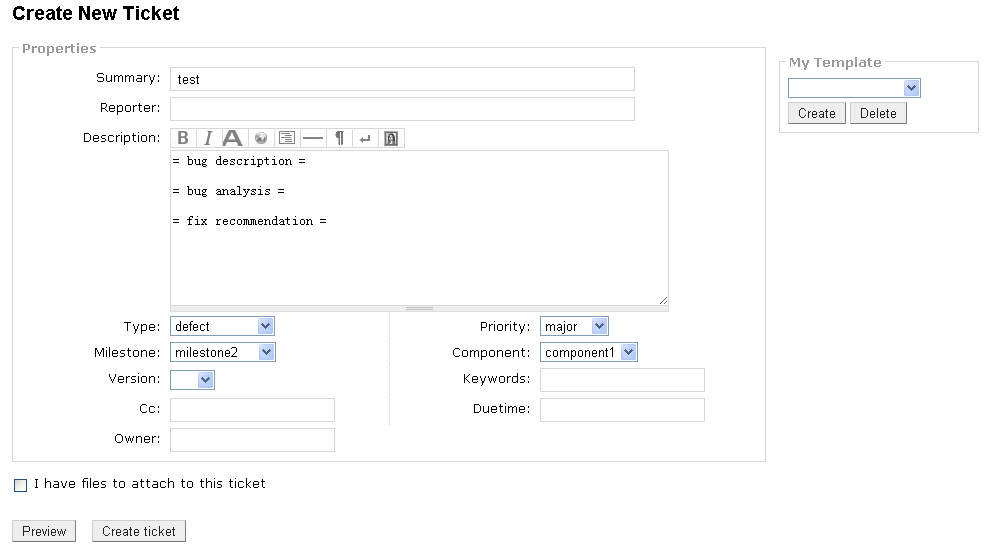
This plugin enables users to create a ticket using templates which can be customized by the Trac administrator and the users themselves.
Key features:
- Trac administrator can specify a general system level template default for all uncustomized ticket types.
- System level ticket templates are ticket type specific.
- User level ticket templates, ie my template, can be managed by common users.
See also TicketStencilPlugin and KeepInterfaceSimplePlugin for plugins with similar functionality.
Changes in version 0.7
- This version has full i18n support with Trac
0.12dev-r9098and above. - New feature: support My Template: everyone can manage their own templates now.
- New feature: add permission TT_USER to fine-grained control My Template.
- New feature: template can include any fields specified in
[tickettemplate] field_list. Just set the fields to the desired values when creating a template from the New Ticket page. - New feature: support template params that can be specified by URL.
- New feature: support importing and exporting ticket_templates (by Russell Ballestrini).
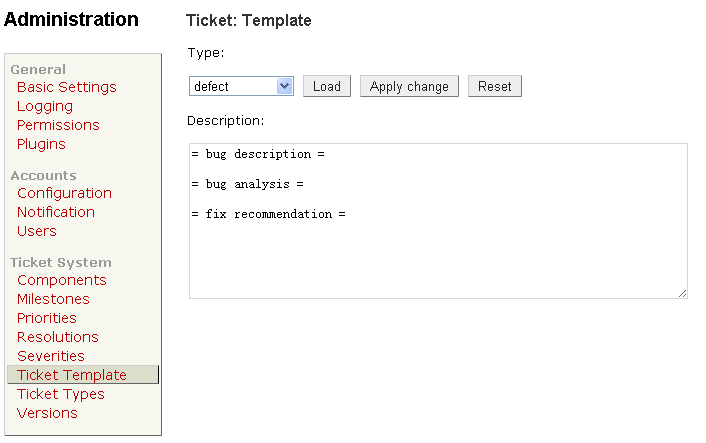
- Trac administrator should define the template for all ticket types:
- Login as administrator, open Admin -> Ticket System -> Ticket Template.
- Load the template of each ticket type, modify them and apply changes.
- After defined ticket template, normal user can create ticket using predefined template by change ticket types dropdown list items.
The New Ticket page

The Admin panel

About template parameters:
- This plugin supports template parameters which can be specified by URL. For example:
- The template:
foo bar %(my_param)s baz qux
- Call newticket:
http://yourtrac/newticket?my_param=anything&owner=myname
- Rendered:
foo bar anything baz qux
- And the owner field would be populated with myname by Trac's default convention.
- Note: be careful choosing the template parameter name to avoid conflicts with existing ticket field names.
See: ZoomQuiet ~ Collection KSPEG Trac hacking.
Bugs/Feature Requests
Existing bugs and feature requests for TracTicketTemplatePlugin are here.
If you have any issues, create a new ticket.
| defect |
25 / 31 |
||
|---|---|---|---|
| enhancement |
6 / 11 |
||
| task |
1 / 1 |
Download
Download the zipped source from here.
Source
You can check out TracTicketTemplatePlugin from here using Subversion, or browse the source with Trac.
Installation
Important: Please backup your ticket templates if you are upgrading this plugin.
Prerequisite: Simplejson when Python is earlier than version 2.6.
You can install this software as a normal Trac plugin:
- Uninstall this plugin if you have installed it before.
- Change to the directory containing
setup.py.- (Optional): If you are using Trac 0.12 with i18n, you should compile language files here:
python setup.py compile_catalog -f
- (Optional): If you are using Trac 0.12 with i18n, you should compile language files here:
- If you want to install this plugin globally, this will install this plugin to the Python path:
python setup.py install
- If you want to install this plugin to one Trac instance only:
python setup.py bdist_egg- Copy the generated egg file to the Trac instance's plugins directory:
cp dist/*.egg /srv/trac/env/plugins
- Configure your
trac.inifile:[components] tickettemplate.* = enabled [tickettemplate] field_list = summary, description, reporter, owner, priority, cc, milestone, component, version, type enable_custom = true
- Set
field_listto choose which field should be included in template. - Set
enable_customto false will disable My Template, of which the default value is true.
- Set
About i18n / l10n support
This plugin is prepared for localization. English message texts are the (POSIX) default.
Current languages supplied with the plugin are:
- English (default)
- Chinese (simplified)
- Japanese
- German
- Italian
If you can't find the language you want, then you can add it yourself.
- Init your language catalog, taking
et_EE(Estonian) as an example:python setup.py init_catalog -l et_EE
- Update catalog:
python setup.py update_catalog -l et_EE
- Translate with your favorite editor, the language file locate in
tickettemplate/loclate/et_EE/LC_MESSAGES/tickettemplate.po- Note: this .po file should be saved with UTF-8 encoding.
- Update catalog again, for normalizing the manual edits:
python setup.py update_catalog -l et_EE
- Generate the compiled catalog:
python setup.py compile_catalog -f
- Reinstall the plugin.
See the l10n cookbook page for Trac plugins for more details.
You've done a new translation? Superb! Contributing your translation is highly appreciated.
You could send it to the plugin's maintainer or contribute to Trac plugin l10n project
via Transifex:
Top translations: Trac_Plugin-L10N » tickettemplate
Recent Changes
- 18654 by jun66j5 on 2024-08-29 09:25:22
-
TracTicketTemplatePlugin 1.0.1dev: make compatible with Trac 1.6 and Python 3 (refs #14355)
- 16409 by rjollos on 2017-03-26 04:34:08
-
1.0dev: Support SubcomponentsPlugin
Patch by komar@evologics.de.
Fixes #12670.
- 15414 by rjollos on 2016-03-08 19:37:35
-
1.0dev: Fix regression in r14729
The
classmethodline should have been removed.
Fixes #12700.
(more)
Author/Contributors
Author: richard
Maintainer: none (needsadoption)
Contributors: hasienda, russellballestrini, rjollos
Attachments (2)
- NewTicketPage-v0.7.png (24.0 KB) - added by 16 years ago.
- AdminTicketTemplatePage-v0.7.png (14.3 KB) - added by 16 years ago.
Download all attachments as: .zip