Contents
Search and replace text in wiki pages
Notice: This plugin is unmaintained and available for adoption.
Description
This plugin allows you to search and replace text in wiki pages. It is based on the WikiRenamePlugin.
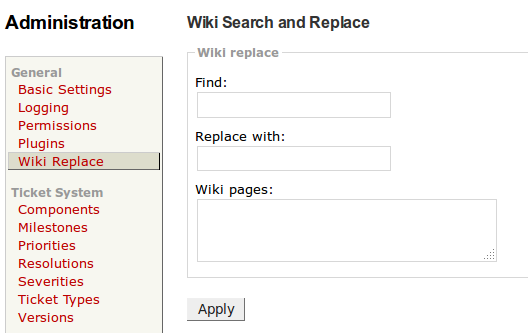
You can access the Wiki Search and Replace form through the Admin > Wiki Replace panel. The wildcard characters * and ? can be used in the wiki page name.

The plugin also provides a TracAdmin command: wiki sub <oldtext> <newtext> <page1> [page2] ....
Bugs/Feature Requests
Existing bugs and feature requests for WikiReplacePlugin are here.
If you have any issues, create a new ticket.
| defect |
3 / 3 |
||
|---|---|---|---|
| enhancement |
3 / 4 |
||
| task |
1 / 1 |
Download
Download the zipped source from here.
Source
You can check out WikiReplacePlugin from here using Subversion, or browse the source with Trac.
Installation
General instructions on installing Trac plugins can be found on the TracPlugins page.
To enable the plugin, add the following to your trac.ini file:
[components]
wikireplace.* = enabled
Configuration
A WIKI_REPLACE permission is available, though anyone with WIKI_ADMIN will also be allowed to replace in pages.
Recent Changes
- 16659 by rjollos on 2017-06-10 00:55:15
-
TracWikiReplace 1.1.2dev: Fix wild-card matching of wiki page names
Refs #12536.
- 16657 by rjollos on 2017-06-09 21:40:41
-
TracWikiReplace 1.1.2dev: Update README
Refs #12536.
- 16656 by rjollos on 2017-06-09 21:31:36
-
TracWikiReplace 1.1.2dev: Replace script with a TracAdmin command
Fixes #12536.
(more)
Author/Contributors
Author: miezuit
Maintainer: none (needsadoption)
Contributors: rjollos
Attachments (1)
-
AdminPanel.png (23.9 KB) - added by 13 years ago.
Screen capture of Admin panel.
Download all attachments as: .zip