


#10488 closed enhancement (fixed)
Modify columns shown in reports {9} and {10}
| Reported by: | Ryan J Ollos | Owned by: | Ryan J Ollos |
|---|---|---|---|
| Priority: | normal | Component: | TracHacks |
| Severity: | normal | Keywords: | |
| Cc: | Steffen Hoffmann, osimons, falkb, chrisnelson, Jun Omae | Trac Release: | 0.10 |
Description (last modified by )
#10478 has me thinking about the information we show in the most commonly used reports {9} and {10}. I've wanted Type and Trac Release to be shown as columns on that report. I believe those are far more useful to most developers than Severity and Component.
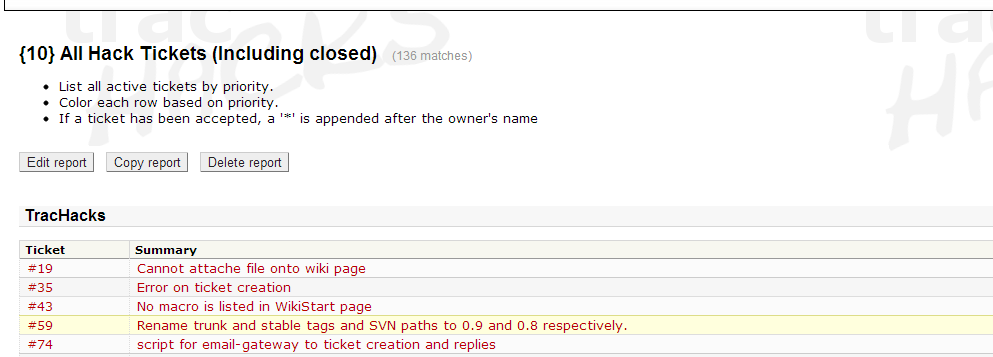
Component information could be shown by making the change component AS __group__, so that the Component displays in the report, but not as a column, rather as shown in the screen capture (for which Component=TracHacks). I was trying to find a way to show the Component in the report title or description, but couldn't find a way to do that. Does anyone know a way (whether it be in Trac 0.10 or later)?

So I open this ticket to request feedback on making the following changes to reports {9} and {10}:
- Add the Type column.
- Add the Trac Release column.
- Don't show the Severity column.
- Don't show the Component column, and group by component.
We could also consider deleting or replacing reports {3} and {6}, since milestones aren't used on t-h.o.
Attachments (1)
Change History (15)
Changed 13 years ago by
| Attachment: | ShowGroup.png added |
|---|
comment:1 Changed 13 years ago by
| Description: | modified (diff) |
|---|
comment:2 follow-up: 3 Changed 13 years ago by
comment:3 follow-ups: 5 11 Changed 13 years ago by
Replying to falkb:
Replying to rjollos:
... a way to show the Component in the report title or description, but couldn't find a way to do that. Does anyone know a way (whether it be in Trac 0.10 or later)?
I think it's not possible.
:-( The other thing I want to see in a report title is $USER. I've never figured out a way to do that.
So I open this ticket to request feedback on making the following changes to reports {9} and {10}:
- Add the Type column.
- Add the Trac Release column.
- Don't show the Severity column.
- Don't show the Component column, and group by component.
As activity indicator, I'd be interested in the ticket's 'Last Modified' datetime as additional column.
How is this different from #10478?
comment:4 Changed 13 years ago by
Replying to rjollos:
... So I open this ticket to request feedback on making the following changes to reports {9} and {10}:
- Add the Type column.
- Add the Trac Release column.
- Don't show the Severity column.
- Don't show the Component column, and group by component.
...
I don't care about the Trac Release but it takes up so little room I won't vote against it. The other changes are good, I think.
comment:5 Changed 13 years ago by
comment:6 Changed 13 years ago by
| Owner: | changed from Michael Renzmann to Ryan J Ollos |
|---|---|
| Status: | new → assigned |
Here is the new report {9}:
SELECT p.value AS __color__,
   id AS ticket, summary, t.type, r.value AS release,
   component AS __group__,
   (CASE status WHEN 'assigned' THEN owner||' *' ELSE owner END) AS owner,
   time AS created,
   changetime AS modified, description AS _description,
   reporter AS _reporter
  FROM ticket t
    LEFT OUTER JOIN ticket_custom r
    ON (t.id = r.ticket AND r.name = 'release')
    JOIN enum p ON p.name = t.priority AND p.type='priority'
  WHERE status IN ('new', 'assigned', 'reopened')
    AND component = '$COMPONENT'
  ORDER BY p.value, severity, time
And here is the diff:
-
(a) a vs. (b) b
a b 1 1 SELECT p.value AS __color__, 2 id AS ticket, summary, component, severity, 2 id AS ticket, summary, t.type, r.value AS release, 3 component AS __group__, 3 4 (CASE status WHEN 'assigned' THEN owner||' *' ELSE owner END) AS owner, 4 5 time AS created, 5 6 changetime AS modified, description AS _description, 6 7 reporter AS _reporter 7 FROM ticket t, enum p 8 FROM ticket t 9 LEFT OUTER JOIN ticket_custom r 10 ON (t.id = r.ticket AND r.name = 'release') 11 JOIN enum p ON p.name = t.priority AND p.type='priority' 8 12 WHERE status IN ('new', 'assigned', 'reopened') 9 AND component = '$COMPONENT' 10 AND p.name = t.priority AND p.type = 'priority' 13 AND component = '$COMPONENT' 11 14 ORDER BY p.value, severity, time
comment:7 Changed 13 years ago by
Here is the new report {10}:
SELECT p.value AS __color__,
    id AS ticket, summary, t.type, r.value AS release,
    (CASE status WHEN 'assigned' THEN owner||' *' ELSE owner END) AS owner,
    time AS created,
    changetime AS modified, description AS _description,
    reporter AS _reporter
  FROM ticket t
    LEFT OUTER JOIN ticket_custom r
    ON (t.id = r.ticket AND r.name = 'release')
    JOIN enum p ON p.name = t.priority AND p.type='priority'
  WHERE component = '$COMPONENT'
  ORDER BY p.value, severity, time
And here is the diff:
-
(a) d vs. (b) c
a b 1 1 SELECT p.value AS __color__, 2 id AS ticket, summary, component, severity, 2 id AS ticket, summary, t.type, r.value AS release, 3 component AS __group__, 3 4 (CASE status WHEN 'assigned' THEN owner||' *' ELSE owner END) AS owner, 4 5 time AS created, 5 6 changetime AS modified, description AS _description, 6 7 reporter AS _reporter 7 FROM ticket t, enum p 8 FROM ticket t 9 LEFT OUTER JOIN ticket_custom r 10 ON (t.id = r.ticket AND r.name = 'release') 11 JOIN enum p ON p.name = t.priority AND p.type='priority' 8 12 WHERE component = '$COMPONENT' 9 AND p.name = t.priority AND p.type = 'priority'10 13 ORDER BY p.value, severity, time
comment:8 Changed 13 years ago by
Replying to rjollos:
[...]
Component information could be shown by making the change
component AS __group__, ...
By doing this, we lose the ability to sort by column (TracReports#ChangingSortOrder). It looks like there is a way in later versions of Trac (t:TracReports#rewriting) to allow sorting by column even when tickets are grouped, but I don't see a way to do it in Trac 0.10. Any suggestions?
comment:9 Changed 13 years ago by
I do think we need the ability to sort these reports, but I'll leave the reports as is to see if anyone has feedback on this today.
comment:10 Changed 13 years ago by
| Resolution: | → fixed |
|---|---|
| Status: | assigned → closed |
| Trac Release: | 0.12 → 0.10 |
I went back to showing the Component as a column for now, and opened ticket #10510 for some modifications to make when we get on Trac 1.0.
{9}:
SELECT p.value AS __color__,
    id AS ticket, summary, component, t.type, r.value AS release,
    (CASE status WHEN 'assigned' THEN owner||' *' ELSE owner END) AS owner,
    time AS created,
    changetime AS modified, description AS _description,
    reporter AS _reporter
  FROM ticket t
    LEFT OUTER JOIN ticket_custom r
    ON (t.id = r.ticket AND r.name = 'release')
    JOIN enum p ON p.name = t.priority AND p.type='priority'
  WHERE status IN ('new', 'assigned', 'reopened')
    AND component = '$COMPONENT'
  ORDER BY p.value, severity, time
{10}:
SELECT p.value AS __color__,
    id AS ticket, summary, component, t.type, r.value AS release,
    (CASE status WHEN 'assigned' THEN owner||' *' ELSE owner END) AS owner,
    time AS created,
    changetime AS modified, description AS _description,
    reporter AS _reporter
  FROM ticket t
    LEFT OUTER JOIN ticket_custom r
    ON (t.id = r.ticket AND r.name = 'release')
    JOIN enum p ON p.name = t.priority AND p.type='priority'
  WHERE component = '$COMPONENT'
  ORDER BY p.value, severity, time
comment:11 follow-up: 12 Changed 13 years ago by
Replying to ChrisNelson:
Replying to falkb:
Replying to rjollos:
... a way to show the Component in the report title or description, but couldn't find a way to do that. Does anyone know a way (whether it be in Trac 0.10 or later)?
I think it's not possible.
:-( The other thing I want to see in a report title is $USER. I've never figured out a way to do that.
=> t:#10979
comment:12 Changed 13 years ago by
Replying to rjollos:
Replying to ChrisNelson:
Replying to falkb:
Replying to rjollos:
... a way to show the Component in the report title or description, but couldn't find a way to do that. Does anyone know a way (whether it be in Trac 0.10 or later)?
I think it's not possible.
:-( The other thing I want to see in a report title is $USER. I've never figured out a way to do that.
=> t:#10979
Thanks, Ryan.
comment:13 Changed 13 years ago by
In case you haven't been following the ticket, the patch I submitted has been scheduled for a 1.1.x development release, so the feature will be available in production release 1.2.
comment:14 Changed 13 years ago by
| Description: | modified (diff) |
|---|

Replying to rjollos:
I think it's not possible.
As activity indicator, I'd be interested in the ticket's 'Last Modified' datetime as additional column.