


#809 closed enhancement (fixed)
Fit long user list display in account admin page to one screen height adding vertical scrollbar
| Reported by: | Owned by: | Steffen Hoffmann | |
|---|---|---|---|
| Priority: | low | Component: | AccountManagerPlugin |
| Severity: | trivial | Keywords: | admin web_ui account |
| Cc: | Trac Release: | 0.11 |
Description
On the WebAdmin page for managing accounts, if an account has the name field and e-mail field filled in, the display table is wide enough to overlap the Add Account box, which is apparently a fixed distance from the right edge of the browser window. It looks OK if the browser is in full-screen mode, but not if it is narrower than the screen.
Attachments (2)
Change History (12)
comment:1 Changed 17 years ago by
| Priority: | normal → low |
|---|---|
| Severity: | normal → trivial |
comment:2 Changed 14 years ago by
| Keywords: | needinfo admin web_ui added |
|---|---|
| Owner: | changed from Matt Good to Steffen Hoffmann |
comment:3 Changed 14 years ago by
We've moved on to 0.12, so 0.9 and 0.11 aren't a concern for us anymore.
The horizontal scrolling works, but you have to scroll down to the very end of the page to invoke it. If you have many accounts (we have over 700), that's kind of painful. It would be nice if there were a cutoff, beyond which the names appeared in a window with both horizontal and vertical scroll bars that fit in a single view of the browser window. (I guess in the permissions window, the browser scroll bar is enough, as there is apparently no horizontal scrolling.)
Thanks for your help.
comment:4 Changed 14 years ago by
| Keywords: | account added; needinfo removed |
|---|---|
| Summary: | Display too wide on account admin page → Fit long user list display in account admin page to one screen height adding vertical scrollbar |
| Trac Release: | 0.9 → 0.11 |
| Type: | defect → enhancement |
I see, but I couldn't figure this out from original request.
In fact, this is a totally different thing, and it's mainly to better reach the "Remove selected accounts" button, since this is the only thing, that is pushed down by a big table, right? Anyway limiting list length sounds like a reasonable request considering your use case. Only I've not thought about it, since I did never encounter more than a dozen users per project by now.
Since it would be a pain for me to create dozens of dummy users just to see what you see, would you share a screen capture with the relevant view (obfuscating any private content of course), please?
Changed 14 years ago by
| Attachment: | screenshot-top.png added |
|---|
Screenshot of top of account admin page.
Changed 14 years ago by
| Attachment: | screenshot-bottom.png added |
|---|
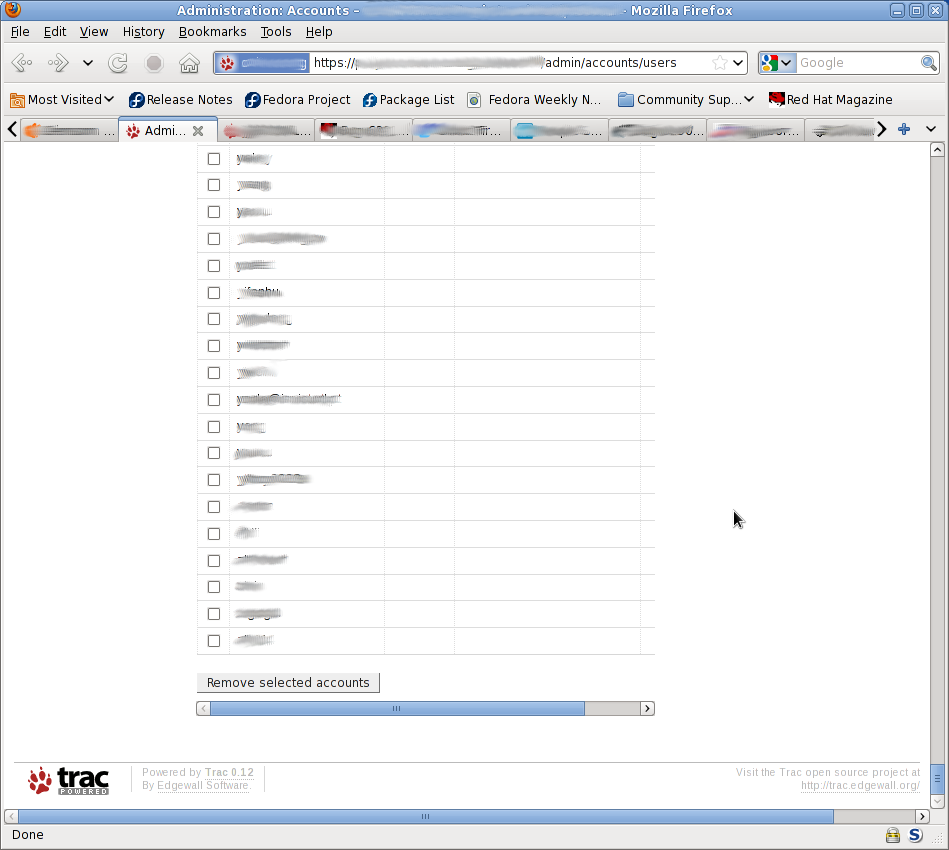
Screenshot of bottom of account admin page.
comment:5 Changed 14 years ago by
I'm attaching shots of the top of a browser window (see the way the Last Login field is obscured) and the bottom (see the scrollbar and the Remove button. The height of the slider in the browser's scroll bar on the right gives some indication of how far down I had to scroll to move the slider to the right to see that the obscured field was indeed Last Login.
comment:6 follow-up: 7 Changed 14 years ago by
| Status: | new → assigned |
|---|
Thank you, exactly what I wanted to see confirmed.
I'll try to take care of this after resolving some security related issues. Actually there's so much to be done here to catch up with maintenance after the plugin was practically unmaintained for half a year. Please nudge me again, if it looks like I've forgotten about this before end of the year.
comment:7 Changed 14 years ago by
Replying to hasienda:
Thank you, exactly what I wanted to see confirmed.
I'll try to take care of this after resolving some security related issues. Actually there's so much to be done here to catch up with maintenance after the plugin was practically unmaintained for half a year. Please nudge me again, if it looks like I've forgotten about this before end of the year.
OK Thx.
comment:8 Changed 13 years ago by
Rather simple fix tested with FF3 (FireBug activ) and Opera9. I'll push this out now, looking forward to receiving your feedback too. Enjoy.
comment:9 Changed 13 years ago by
| Resolution: | → fixed |
|---|---|
| Status: | assigned → closed |
(In [9583]) AccountManagerPlugin: Limit user list at users admin page, closes #809.
So we get vertical scrollbar aside the user list table and keep the "Remove selected accounts" button below visible regardless of list length. Improve navigation for new account details admin page by changing previously silent redirect into redirect with warning message explaining the reason why.
comment:10 Changed 11 years ago by
(In [12738]) AccountManagerPlugin: Move pager to user list in accounts admin panel, refs #809, #9946, #10682, #10745, #10754 and #10873.
This should fix broken display of extra-long user lists, and it makes selections from user list useful for the clean-up page as requested.
Dumped access to anonymous session attributes for the current solution, so these are no longer available for clean-up in the admin web-UI, but I'll re-implement this later on, if it will be missed too much.


Sorry for the long time without any reaction.
I'm unable to reproduce this with trunk version and Trac 0.12 right now. The accounts table does not overlap but scrolls. In fact looks even better to me than the Trac web admin page for permission settings, that has a similar design in full-screen size.
I may try to fix it for 0.11, not 0.9 anymore, if there would be an issue related to that Trac version, so verify and report back, please.