Contents
Display a tag cloud with a ticket
Notice: This plugin is unmaintained and available for adoption.
Description
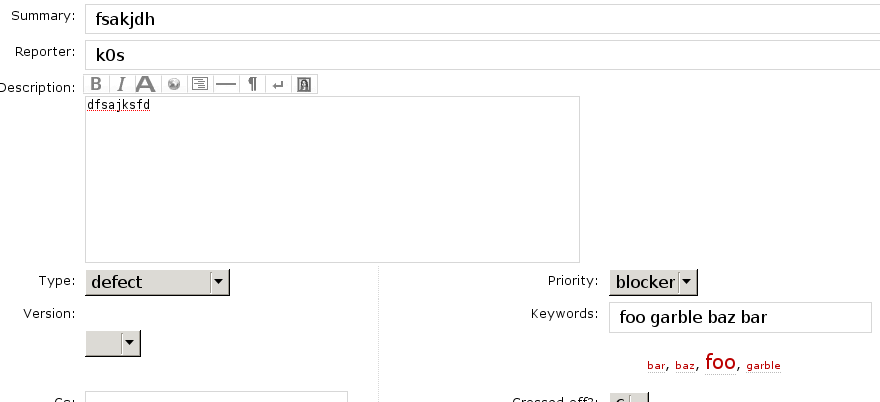
Ticket keywords are used to categorise tickets and they can be seen collectively on the tag cloud page, provided the TagsPlugin is installed. However, there is no way of seeing what these tags are from the ticket page. This plugin inserts the tag cloud under the keywords text input for easy reference. Clicking on the tags inserts them into the keywords fields.
When creating a new ticket or viewing an existing ticket, you should see a tag cloud under the keywords field, as shown in the bottom right corner:

See also TracKeywordsPlugin, TagsPlugin.
Bugs/Feature Requests
Existing bugs and feature requests for LoomingCloudsPlugin are here.
If you have any issues, create a new ticket.
| defect |
6 / 6 |
|
|---|---|---|
| enhancement |
7 / 7 |
Download
Download the zipped source from here.
Source
You can check out LoomingCloudsPlugin from here using Subversion, or browse the source with Trac.
Installation
General instructions on installing Trac plugins can be found on the TracPlugins page.
Install TagsPlugin. Make sure to select the appropriate version for LoomingCloudsPlugin depending on the Trac release you are using:
Recent Changes
- 18234 by Cinc-th on 2021-04-18 14:14:11
-
LoomingCloudsPlugin: make it compatible with Trac > 1.4 by dropping
ITemplateStreamFilter
- Genshi no longer required.
- Better positioning of tag cloud below the
keywordsfield (see #13604). - Added some help text.
Closes #13604
- 18233 by Cinc-th on 2021-04-18 11:41:39
-
Require Trac 1.4 after TagsPlugin moved to Trac 1.4 and beyond.
- 18232 by Cinc-th on 2021-04-18 11:36:15
-
V1.0.0 of LoomingCloudsPlugin. Next version will be >= Trac 1.4 after TagsPlugin is moving to Trac 1.4 and later.
(more)
Author/Contributors
Originally developed at The Open Planning Project
Author: k0s
Maintainer: none (needsadoption)
Contributors: obs
Attachments (1)
- screenshot.png (22.5 KB) - added by 15 years ago.
Download all attachments as: .zip