Contents
Tweak the Trac user interface
Description
This plugin implements a Javascript deployment platform, which enables Trac administrators to easily tweak Trac pages by using Javascript.
Key features:
- Apply different javascripts to different pages by matching regular expression.
- Supports Trac web admin.
Admin Trac Tweak UI with addon javascript plugins
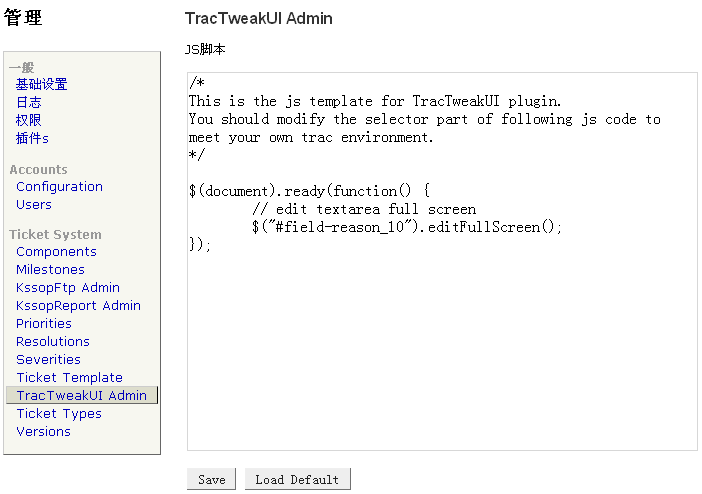
- Enter Trac's Web Admin, select TracTweakUI Admin.
- Add url path(regular expression): /newticket.
- Select /newticket, then select filter editcc.
- Click Load Default, and edit filter javascript, then Save.
- Now click New Ticket to test the editcc Javascript plugin.
The administration page:

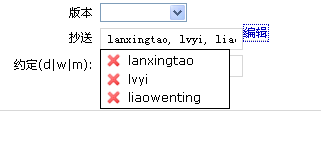
The edit-cc feature:

Admin Trac Tweak UI with any other Javascript plugins
- Take autocomplete for instance.
- Prepare autocomplete directory in the Trac environment:
$ mkdir /path/to/trac/environment/htdocs/tractweakui/autocomplete
$ cp main.css /path/to/trac/environment/htdocs/tractweakui/autocomplete/
$ cp jquery.autocomplete.css /path/to/trac/environment/htdocs/tractweakui/autocomplete/
$ cp jquery.autocomplete.js /path/to/trac/environment/htdocs/tractweakui/autocomplete/
$ cp jquery.bgiframe.min.js /path/to/trac/environment/htdocs/tractweakui/autocomplete/
$ cp indicator.gif /path/to/trac/environment/htdocs/tractweakui/autocomplete/
$ touch /path/to/trac/environment/htdocs/tractweakui/autocomplete/__template__.js
- Edit
__template__.js(optional):jQuery(function($) { var months = ['January', 'February', 'March', 'April', 'May', 'June', 'July', 'August', 'September', 'October', 'November', 'December']; $("#field-cc").autocomplete(months); });
- Now you can admin and test autocomplete Javascript plugins as described above.
Alternative: the AddStaticResourcesPlugin accomplishes many of the same goals of this plugin. Very simple deployment and trac.ini configuration, ie no webadmin screens. Doesn't require an environment upgrade.
See: ZoomQuiet ~ Collection KSPEG Trac hacking
Bugs/Feature Requests
Existing bugs and feature requests for TracTweakUiPlugin are here.
If you have any issues, create a new ticket.
| defect |
5 / 5 |
|---|
Download
Download the zipped source from here.
Source
You can check out TracTweakUiPlugin from here using Subversion, or browse the source with Trac.
Installation
General instructions on installing Trac plugins can be found on the TracPlugins page.
Enable the plugin with the following rule:
[components]
tractweakui.* = enabled
Recent Changes
- 17171 by rjollos on 2018-05-09 20:43:38
-
TracTweakUI 1.2dev: Remove need to copy templates to env htdocs dir
Refs #13428.
- 17170 by rjollos on 2018-05-09 19:45:46
-
TracTweakUI 1.2dev: Make compatible with Trac 1.2
Refs #13428.
- 17169 by rjollos on 2018-05-09 19:04:17
-
TracTweakUI 1.2dev: Branch for Trac 1.2 support
(more)
Author/Contributors
Author: richard
Maintainer: Richard Liao
Contributors:
Attachments (2)
- trac_tweakui_demo_1.png (17.9 KB) - added by 17 years ago.
- trac_editcc.png (4.2 KB) - added by 17 years ago.
Download all attachments as: .zip